
Vaulty : Photo Vault & Hide
Squid Tooth LLCPhotography
4.552.05K Reviews
- Version
- 26.08.27
- Installs
- 10.00M
- Age Rating
- Everyone
Screenshots
Our Review of Vaulty : Photo Vault & Hide
 Analysis by Appyee
I judge a photo vault less by how secret it sounds and more by how it fits into the habits I already have: how quickly I can move a picture out of my everyday gallery, whether I can find it again, and what happens if I change phones. Those details matter more than a long list of locks. Vaulty: Photo Vault & Hide is aimed at people who want a separate place for private pictures and videos without turning photo organization into a complicated project.
Start with what you need to protect
Before moving anything, I’d decide whether the goal is simply to keep certain images out of casual view or to build a more deliberate private archive. Those are different needs. A vault can help with the first, but it should not be treated as a guarantee that sensitive files are protected in every situation. I would still use a strong, memorable passcode and avoid relying on a single app as the only copy of anything irreplaceable.
That distinction is useful when choosing between Vaulty and the alternatives. A standard gallery is convenient for browsing and sharing, while a general file manager can be better if you want to handle many kinds of documents together. A dedicated photo vault makes more sense when the main job is separating selected media from the pictures you routinely show people. I like that narrower focus, though it also means the app is not a replacement for a full photo library or a broader backup plan.
A practical fit for everyday privacy
A realistic use for Vaulty is a phone you sometimes hand to a friend or family member to look at holiday photos. Before passing it over, you can keep personal images in a separate space rather than worrying that an accidental swipe will reveal something private. The same approach can help with screenshots containing personal details or pictures you want to keep away from a shared gallery. I’d move only the items that need that separation, then leave ordinary camera-roll photos where they are; that keeps the vault easier to browse.
Vaulty is a photography app from Squid Tooth LLC. It has been around since July 16, 2010, and its current version is 26.02.05. Its long availability and broad audience are reassuring signals for someone looking for an established tool, but they do not replace checking that the app works for your own device and habits. It is free to install, rated for Everyone, and has an average rating of 4.5 from around 414,000 ratings, with over 10 million installs. In-app purchases range from $0.99 to $99.99 per item, so I would look carefully at the purchase screen before paying for anything.
Where a focused vault helps—and where it doesn’t
The main advantage over leaving everything in the regular gallery is a cleaner boundary: private media has its own place, rather than being mixed into the stream you browse or share. Compared with using a general file manager, Vaulty is more directly built around viewing and sorting photos and videos. That can make it feel more natural for a small personal collection. On the other hand, people who already organize media through a device’s built-in private album or a broader encrypted storage workflow may prefer to keep everything in one system instead of maintaining another destination.
There is a small but important trade-off in that separation. Moving pictures into a vault changes where you look for them, and it can add a step when you want to share or edit one. I’d test the full path with a few non-sensitive images first: add them, find them later, and see how exporting or using them elsewhere fits your routine. That quick trial is more useful than moving a large collection immediately, especially if you depend on particular gallery or editing workflows.
What to check before relying on it
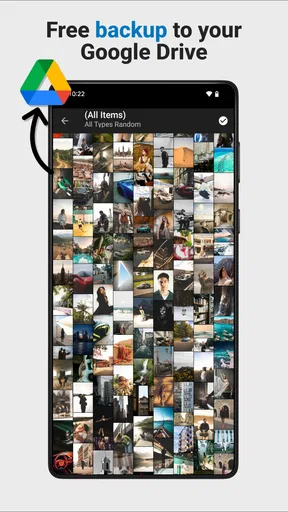
For anyone deciding whether Vaulty can serve as a backup, I would distinguish “stored separately” from “safely recoverable.” The app offers an online backup option, but I’d check its settings and complete a small recovery test before trusting it with the only copy of important media. A backup is valuable only if you know how to retrieve it when your phone is unavailable. Keeping another copy of truly important files in a place you control is still sensible.
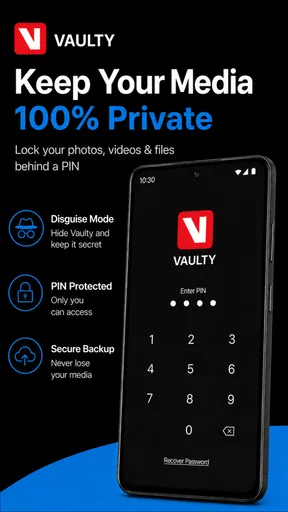
I’d also think about access in ordinary situations: will you remember the credential, and can you get into the vault when you are in a hurry? A PIN or password that is too easy to guess weakens the point; one you cannot recall can lock you out of your own collection. Pick something you can reliably enter, and make sure you understand the app’s recovery options before placing anything valuable inside. For shared devices, remember that privacy depends on who can unlock the phone and the vault, not just on the app being installed.
Who should choose another approach
If you want a full-featured photo manager for albums, editing, and everyday sharing, a regular gallery or dedicated photo-organizing app may be a better center for your library. If your priority is storing many types of files under one security system, a file vault may suit you more. And if you need guaranteed recovery across devices, compare the backup and export process with your existing cloud or computer workflow before making Vaulty the sole home for anything important.
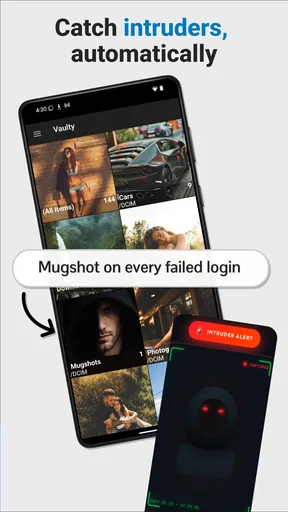
I’d be cautious about treating any hidden-photo app as invisible or foolproof. The extra “mugshots” feature described in the app experience may appeal to people who want to know about attempted access, but it is not a substitute for a strong credential or careful device security. I would also avoid using the vault as a place to forget files: private storage still needs occasional housekeeping, and a quick inventory makes it easier to notice what you moved and what you might need to retrieve.
Setting Up Your Private Vault
Getting started with Vaulty: Photo Vault & Hide is a breeze. After downloading the app, you'll be prompted to set up a PIN or password. This is your key to accessing the vault, so make sure it’s something you can remember but isn’t too obvious. The app gives a very user-friendly vibe, guiding you through each step. Plus, the setup is quick, so you can start hiding your photos in no time.
Organizing Your Hidden Treasures
Once inside, organizing your photos is as simple as pie. You can create different folders and even rename them, making it easy to sort your images by whatever category you fancy. Family pics, work documents, or maybe those hilarious memes you don’t want anyone else to see - everything can have its place. It’s like Marie Kondo for your secret stash!
The app also allows for smooth navigation. You can swipe through your photos as you would in any gallery app, which is a nice touch for those who like to keep things simple and efficient. Honestly, I was impressed by how seamless it all felt.
The Safety Features You’ll Love
One of the standout features of Vaulty is its multi-layer security. Aside from your PIN or password, the app has a nifty little feature called "mugshots". If anyone tries to break into your vault, the app will snap their picture without them knowing. It’s like having your own little security camera! This feature adds an extra layer of protection and peace of mind.
And if you’re worried about losing your photos due to a phone mishap, Vaulty has your back. The app offers an online backup option, ensuring your photos are safe and retrievable even if you lose your device. Just make sure to enable it for that extra security blanket.
Interface and Usability
In terms of design, Vaulty sports a clean and straightforward interface. It’s not cluttered with unnecessary features and focuses on doing what it promises - keeping your photos safe. I appreciated the simplicity, especially since apps like these can sometimes get too bogged down with extras that make navigation a pain.
The app is also super responsive. I didn’t notice any lag while switching between folders or while uploading photos, which is always a plus. It’s clear the developers have focused on making the user experience as smooth as possible.
Why Vaulty Stands Out
There are plenty of photo vault apps out there, but Vaulty does a great job of combining security with usability. It doesn’t just lock your photos away; it makes sure they’re organized and easily accessible to you, and only you. The added security features, like the "mugshots" and online backup, give it an edge over some of the other apps in the market.
Plus, the app doesn’t bombard you with ads, which is a blessing in disguise. It feels like a premium product even if you’re using the free version. But, if you’re looking for some extra features, there are in-app purchases available that might be worth considering.
Final Thoughts
Overall, Vaulty: Photo Vault & Hide is a solid choice for anyone looking to keep their photos private. It’s easy to use, reliable, and offers some fantastic security features. Whether you’re hiding away personal pics or just want a bit of privacy, this app has got you covered.
So, if you’re on the hunt for a trustworthy photo vault, give Vaulty a shot. It might just be the app you didn’t know you needed until now. Keep your secrets safe and sound, and enjoy the peace of mind knowing your photos are secure!
Verdict
Strengths of Vaulty : Photo Vault & Hide
- Easy-to-use interface for quick setup.
- Strong encryption keeps photos secure.
- Customizable folders for better organization.
- Supports multiple file formats easily.
- No need for an internet connection.
Limitations of Vaulty : Photo Vault & Hide
- Limited cloud backup options.
- Ads can be intrusive at times.
- No automatic photo upload feature.
- Lacks advanced editing tools.
- Some features require in-app purchases.
Similar Picks in This Category
View All
Google Photos
Google LLC4.4

Gallery
Google LLC4.2

Picsart AI Photo Editor, Video
PicsArt, Inc.3.9

B612 AI Photo&Video Editor
SNOW Corporation4.1

BeautyPlus-Selfie Photo Editor
PIXOCIAL TECHNOLOGY (SINGAPORE) PTE. LTD.4.5

Remini - AI Photo Enhancer
Bending Spoons4.1
Frequently Asked Questions
What is Vaulty: Photo Vault & Hide, and how does it work?
Vaulty: Photo Vault & Hide is a privacy-focused app designed to securely store and hide your photos and videos on your device. It works by encrypting your media files and storing them in a secure vault that only you can access with a password or PIN. This ensures that your private photos and videos remain hidden from prying eyes.
Is Vaulty free to use, or does it have in-app purchases?
Vaulty offers a free version with basic features, allowing you to hide and encrypt your media files. However, for more advanced features like cloud backup and additional security options, you may need to purchase the premium version through in-app purchases. This allows users to choose the level of protection that suits their needs.
How secure is Vaulty, and what measures does it take to protect my data?
Vaulty employs robust encryption techniques to secure your photos and videos. The app uses a password or PIN to restrict access, ensuring that only authorized users can view the hidden content. Additionally, Vaulty features an automatic backup option to protect your media in case of device loss or damage, enhancing overall data security.
Can I recover my photos and videos if I forget my password?
If you forget your password, Vaulty offers a password recovery option, provided you have set up a recovery email during the initial setup. This feature helps you regain access to your hidden media. However, if you haven't set up recovery options, it might be challenging to retrieve your content, emphasizing the importance of setting up recovery details.
Does Vaulty affect the quality of my photos and videos?
Vaulty does not alter the quality of your photos and videos when storing them in the vault. The app is designed to preserve the original quality of media files, ensuring that when you retrieve and view them, they appear just as they were initially captured. This maintains the integrity and visual fidelity of your stored content.
